The real problem: you cannot prove what is working
If you are running a home services or trades business on ServiceTitan and HubSpot, you probably have three conflicting stories about performance. HubSpot says campaigns are crushing it based on form fills and deals, ServiceTitan shows thin margins and unpredictable revenue, and your bank account tells a third story.
Most teams are stuck in one or more of these situations.
- Marketing is judged on leads, not completed and paid jobs
- Sales pipelines in HubSpot never line up with jobs and invoices in ServiceTitan
- CFOs and owners do not trust ROI reports, so budgets get cut or frozen
- Leadership meetings devolve into arguing over whose numbers are right
- No one can quickly answer simple questions like
- Which campaigns generated the most booked revenue last quarter
- Which service lines or business units are actually profitable
- Which technicians drive the most marketing attributable revenue
The core issue is not effort or talent. The issue is architecture. ServiceTitan is your operational system of record. HubSpot is your go to market and reporting system. When they are not integrated around a clear reporting strategy, every report is a partial truth.
Proven ROI focuses on one outcome with HubSpot and ServiceTitan integrations. Close the loop between first touch engagement in HubSpot and completed, paid jobs in ServiceTitan so you can measure real ROI, not just lead volume.
Why most HubSpot and ServiceTitan “integrations” still fail
Connecting HubSpot and ServiceTitan is not enough. How the integration is designed determines whether your reports will be trusted or ignored.
Here is why many teams fail even after they “integrate” the two systems.
- They sync the wrong objects
Many integrations sync only contacts or basic job records and ignore invoices, payments, job status history, and attribution fields. That produces vanity reports that overstate revenue and understate cancellations, write offs, and no shows. - They stop at lead attribution
Reporting stops at form fills, calls, or booked appointments. Invoices and payments never make it back into HubSpot. That means campaigns get credit for leads that never sold, jobs that never completed, or invoices that were never collected. - They pick the wrong HubSpot data model
Some home services organizations model everything around contacts when companies would be better for roll up reporting by household or property. Others ignore business units and locations and lose all the nuance they need on margin and capacity by region. - They do not standardize identity
Duplicate customers, inconsistent phone numbers, and mismatched addresses between HubSpot and ServiceTitan break reporting. Without a clean identity strategy, you cannot trust job counts, win rates, or revenue per customer. - Reports are built without the operations team
Marketing builds dashboards in HubSpot that do not match how dispatchers, call center staff, or technicians work in ServiceTitan. The result is data that looks good in a deck but never guides daily decisions.
You do not need another shallow integration. You need a reporting driven integration where every field mapping and workflow is chosen because it supports a specific, measurable outcome. Proven ROI approaches HubSpot and ServiceTitan that way.
The opportunity: closed loop job revenue attribution
Closed loop job revenue attribution is the foundation of meaningful reports between HubSpot and ServiceTitan.
A simple definition you can reuse in your organization
Closed loop job revenue attribution means connecting original marketing source data stored in HubSpot to completed job revenue and paid invoices from ServiceTitan so ROI is measured on finished work, not form submissions.
When you build your integration and reports around that idea, five things become possible.
- You see which channels and campaigns generate real revenue, not just inquiries
- You can defend budget increases because you are using completed job data
- You can align incentives between marketing, sales, and operations
- You can compare performance across locations, business units, and service lines
- You can make confident decisions about scaling ads, staffing, and pricing
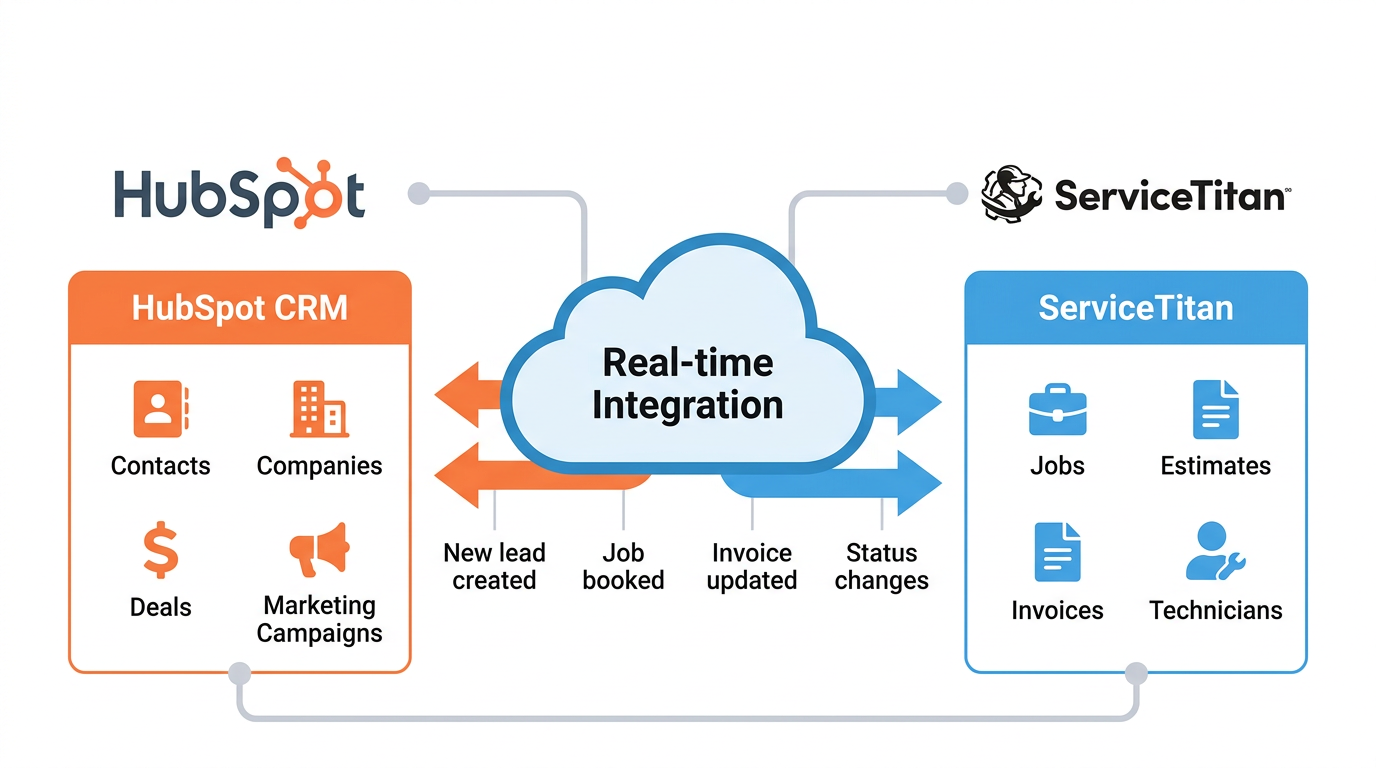
ServiceTitan is already tracking jobs, estimates, invoices, and payments. HubSpot is already tracking traffic sources, campaigns, forms, and sales activities. The integration connects these into a single story that everyone can rely on.
The data you must sync between HubSpot and ServiceTitan
To build reports that show impact, you do not need every field. You need the right fields mapped cleanly in both directions.
Proven ROI typically focuses on five categories of data.
- Identity
This is how you know you are looking at the same customer or property in both systems.- Customers and contacts
- Phone numbers and emails
- Addresses and service locations
- Demand
This is how leads become opportunities and booked appointments.- Lead source and campaign
- Form submissions and calls
- Booking requests and appointment set events
- Work
This is what actually happens in the field.- Jobs and job types
- Job status history from scheduled to completed
- Technicians and business units
- Money
This is where revenue and margin live.- Estimates and sold amounts
- Invoices and invoice status
- Payments, discounts, and memberships
- Attribution
This is the marketing level context that supports ROI analysis.- Original source and campaign
- Keyword intent proxy fields
- Call tracking and offline conversion IDs
When Proven ROI designs a HubSpot and ServiceTitan integration, the first decision is which object in HubSpot represents the ultimate “job revenue” record. For most home services organizations, that is either a deal tied to a company or a deal tied to a contact that is synced to one or more jobs and invoices in ServiceTitan.
Step by step: the Proven ROI integration blueprint
The point of integrating HubSpot and ServiceTitan is not just automation. It is reporting. Here is a blueprint you can follow and adapt with your team or with Proven ROI as your implementation partner.
Step 1: Define your reporting questions
Before you connect any APIs, write down the three to five questions you need to answer every week and every quarter. For a home services company in Austin or any other market, those questions might look like this.
- Which marketing channels created the most completed and paid job revenue in the last 90 days
- What is our true cost per completed job by channel and campaign
- How does average job value differ by service type, technician, and location
- Which neighborhoods or ZIP codes produce the highest lifetime value
- Which membership or maintenance plans generate the most renewal revenue
These questions become your integration requirements. If a field or object does not support a key question, it becomes optional. If a question cannot be answered with your current systems, that becomes a design challenge to solve.
Step 2: Choose your HubSpot data model
Next, decide if your primary revenue reporting roll up should be at the company or contact level inside HubSpot.
- Use a company centered model when
- You sell multiple service lines to the same household or property
- You need roll up reporting across multiple contacts and jobs
- You track revenue by address or property, not just by person
- Use a contact centered model when
- You sell mostly one time jobs to individual homeowners
- You do not need complex household level aggregation
- Your marketing and sales workflows revolve around individuals
Proven ROI has seen both models work in real home services environments. The choice is never generic. It determines how your ServiceTitan customers, locations, and jobs map into HubSpot records and how your reports roll up revenue.
Step 3: Map ServiceTitan objects to HubSpot objects
Once your model is clear, map each critical ServiceTitan object to a HubSpot object and define the direction of sync.
A typical pattern looks like this.
- ServiceTitan customers map to HubSpot companies or contacts
- Jobs map to deals or custom objects that represent work orders
- Job status history maps into properties or timeline events
- Invoices map into revenue properties on deals or transactions
- Payments map into revenue recognition fields or custom objects
The exact mapping depends on your HubSpot subscription level and how sophisticated you want your revenue reporting to be. Proven ROI often uses custom objects and HubSpot’s custom report builder to model complex job and invoice relationships while still keeping reports understandable for leaders.knowledge.
Step 4: Implement the integration with the right tools
You can connect HubSpot and ServiceTitan using several approaches.
- For simple workflows
Middleware tools such as Zapier or Make can sync basic contacts, jobs, and events. This works for smaller teams that need straightforward automation like creating tasks when a job is scheduled or sending review request emails when a job is completed. - For scalable, closed loop reporting
A custom API integration or private app is usually necessary. This approach gives you full control over field mappings, job status rules, invoice logic, and error handling. Proven ROI implementations typically rely on ServiceTitan API access, HubSpot developer tools, and a middleware layer such as AWS Lambda or similar platforms.
The development work is not just technical. It includes documenting data flows, defining when a job is considered “completed” for reporting, and deciding how to handle edge cases like cancellations, unpaid invoices, or multi visit jobs.
Step 5: Normalize identity and attribution
Before you build reports, you must make sure HubSpot and ServiceTitan agree on who the customer is and where they came from.
Proven ROI often standardizes around
- Primary phone number and email combinations
- Clean, normalized addresses and ZIP codes
- Stable external IDs for customers, jobs, and invoices
- A single source of truth for original marketing source and campaign
This step is where many DIY integrations fail. If two systems cannot reliably recognize the same customer and job, your revenue per customer and per channel metrics will always be in question.
How to create HubSpot reports that show the impact of your ServiceTitan data
Once your integration is in place, HubSpot becomes your reporting and insight layer for ServiceTitan job and revenue data.knowledge.
Here is how to build the reports that matter.
Use the HubSpot custom report builder as your reporting engine
HubSpot’s custom report builder lets you combine multiple data sources, filter by properties, and visualize insights in a way that is accessible to non technical leaders.knowledge.
When ServiceTitan data is synced properly, you can build reports that join
- Deals or jobs with invoices and payments
- Companies or contacts with job counts and revenue
- Marketing campaigns with completed job revenue and margin
The process inside HubSpot usually follows five steps.
- Select data sources such as deals, companies, custom job objects, and invoice properties that are populated from ServiceTitan.
- Add fields like original source, campaign, job type, job status, invoice amount, and payment status.knowledge.
- Apply filters to focus on completed jobs, paid invoices, and your desired date range.knowledge.
- Choose visualizations like bar charts for revenue by channel, tables for job level details, and time series for trends.knowledge.
- Save reports to dashboards that are shared with marketing, sales, and operations leaders.knowledge.
Proven ROI often builds separate dashboards for executives, marketing managers, and operations leaders so each group sees the exact metrics they need without noise.
Core revenue reports every HubSpot and ServiceTitan integration should have
While every business is different, there is a set of reports that almost every home services team benefits from once HubSpot and ServiceTitan are integrated.
- Revenue by channel and campaign based on completed jobs
This report shows total completed job revenue and job counts grouped by original source and campaign for a selected period. It is your primary budget steering document because it connects ad spend to real work finished in the field. - Cost per completed job
This report compares marketing spend to the number of completed jobs from each channel. It moves your conversation from cost per lead to cost per actual job, which is far more predictive of profitability. - Average job value and margin by job type
Here you slice revenue and average invoice size by job type, service line, or project category. It identifies which services should be highlighted in campaigns and which need pricing or process changes. - Revenue by technician and business unit
By syncing technician and business unit data from ServiceTitan into HubSpot, you can analyze which teams and individuals drive the most revenue and customer value. This supports staffing, training, and incentive design. - Membership and recurring revenue performance
When membership, maintenance, or subscription data from ServiceTitan flows into HubSpot, you can monitor renewal rates, upsell performance, and lifetime value by campaign and channel.
Each of these reports is built on the same foundation. A reliable mapping between ServiceTitan jobs, invoices, and payments and HubSpot objects with marketing attribution attached.
Real world scenarios: what this looks like in practice
To understand the impact, it helps to visualize real scenarios where a solid HubSpot and ServiceTitan integration changes decisions.
Scenario 1: reallocating budget after closing the loop
A regional HVAC company is running campaigns across paid search, local service ads, and direct mail. Before integration, they optimize to lead volume and call counts.
Once jobs, invoices, and payments from ServiceTitan sync into HubSpot with original source attached, their reports show
- One channel generates cheaper leads but lower average job value and more cancellations
- Another channel looks expensive on a cost per lead basis but produces high ticket system replacements with strong collections
With closed loop reporting, they reallocate spend to the channel that produces the most completed and paid job revenue, not the most form fills. Profit improves even though total leads decrease.
Scenario 2: operator level insight in a local market
A home services brand with locations across Texas uses business units in ServiceTitan and regions in HubSpot to segment performance. Austin, San Antonio, and Houston are all running similar campaigns.
By integrating the systems and building regional dashboards in HubSpot, they can see
- Austin is generating strong lead volume but low revenue per job because of discount heavy offers
- Houston has fewer leads but higher job values due to upsell heavy campaigns
- San Antonio is underperforming because jobs stall at the estimate stage and do not convert
With this visibility, leadership can adjust offers, training, and staffing market by market instead of applying broad, generic strategies.
How to make your reports AI ready and snippet friendly
As AI overviews and answer engines become a larger part of search behavior, your internal reports must be explainable in simple, direct language. That also shapes how content and dashboards should be documented for your team.
To make your HubSpot and ServiceTitan reporting strategy AI friendly
- Use clear, consistent definitions for metrics like completed job, paid job, cost per completed job, and revenue attribution
- Name properties and dashboards in plain language that matches how humans ask questions
- Document your reporting rules so anyone reading a dashboard knows exactly what is included and excluded
When Proven ROI builds integrations and reports, we focus on concise descriptions, unambiguous field names, and dashboards that could be read aloud in a leadership meeting and still make sense. That same clarity is what makes your data and processes easy for AI tools to summarize and reference internally.
Why Proven ROI is the right partner for HubSpot and ServiceTitan reporting
You can hire any developer to connect two APIs. You need a partner that understands home services, HubSpot, ServiceTitan, and revenue attribution.
Proven ROI brings a few advantages to this specific problem.
- Deep home services experience
Proven ROI works with home services teams that live in ServiceTitan every day and rely on HubSpot as their growth engine. That experience informs which data is worth syncing and which is noise. - Reporting first approach
Every integration is designed from the reporting questions backward, not from the API documentation forward. This ensures you do not pay for custom work that never turns into insights leaders actually use. - Closed loop specialization
Proven ROI focuses on closed loop job revenue attribution, not just basic lead syncing. The goal is to prove impact on completed and paid jobs, which is what ultimately funds your growth. - Practical, scalable implementations
Whether you are a single location in Austin or a multi region operator, Proven ROI builds integrations that support your current size and your growth plan. Middleware, private apps, and HubSpot reporting are chosen based on your real constraints and opportunities.
Clear next steps if you want reports that actually prove impact
Here is a simple sequence you can follow if you are serious about getting real reporting value from a HubSpot and ServiceTitan integration.
- Write down the five revenue questions you want answered every month
- Decide whether your primary reporting object in HubSpot should be companies or contacts
- List the ServiceTitan objects and fields needed to answer those questions
- Map those fields to HubSpot objects and properties
- Choose your integration approach based on complexity and budget
- Normalize identity and attribution fields across both systems
- Build your first set of dashboards in HubSpot around completed and paid jobs
If you want to move faster and avoid common integration mistakes, partnering with Proven ROI gives you a proven blueprint, tested field mappings, and reporting frameworks that operators already trust.
HubSpot and ServiceTitan together can be more than a tech stack. With the right integration and reporting strategy, they become a single, reliable source of truth that shows exactly which actions create revenue and where to invest next.